WooCommerce Maintenance: The Definitive 2026 Guide

Get Your Free Website Audit
($3,000 Value)
- Uncover performance issues
- Identify SEO opportunities
- Security gaps, and quick wins
Table of Contents
- Quick Answer: What Is WooCommerce Maintenance?
- What WooCommerce Maintenance Actually Covers
- Why WooCommerce Maintenance Is Different From WordPress Maintenance
- What Happens When You Skip WooCommerce Maintenance
- The Complete WooCommerce Maintenance Checklist
- The 7 WooCommerce Maintenance Tasks Most Plans Miss
- How Much Does WooCommerce Maintenance Cost?
- In-House vs. DIY vs. Agency: Which Is Right For You?
- How to Choose a WooCommerce Maintenance Provider
- When to Upgrade Your WooCommerce Maintenance Plan
- Protect Your Revenue Engine
- WooCommerce Maintenance FAQs
Your WooCommerce store is a revenue engine. The moment it slows down, breaks at checkout, or goes offline, it stops doing its job.
WooCommerce maintenance and ongoing WooCommerce support are what keep that revenue engine running. Done well, they protect your online store from downtime, cyber threats, and the dozens of small failures that quietly chip away at conversions. Done badly, or skipped entirely, it costs you sales you’ll never see.
This is the complete guide. What WooCommerce maintenance is, what it includes, what it costs in 2026, and how to choose the right approach for your store.
Let’s get into it.
Quick Answer: What Is WooCommerce Maintenance?
WooCommerce maintenance is the routine maintenance process of updating, securing, monitoring, backing up, and optimizing a WooCommerce website so it stays fast, stable, and revenue-ready. It includes WordPress core updates, software updates for WooCommerce plugins and themes, checkout testing, payment gateways verification, security monitoring, malware scanning, regular backups, performance optimization, and database optimization.
What WooCommerce Maintenance Actually Covers
WooCommerce maintenance, sometimes called WooCommerce website maintenance, is broader than WordPress maintenance because WooCommerce stores carry more risk per visitor.
A blog with a broken theme update is annoying. A store with a broken checkout is losing money in real time. Every minute matters when a customer is one click away from buying. That changes the standard for what maintenance has to look like.
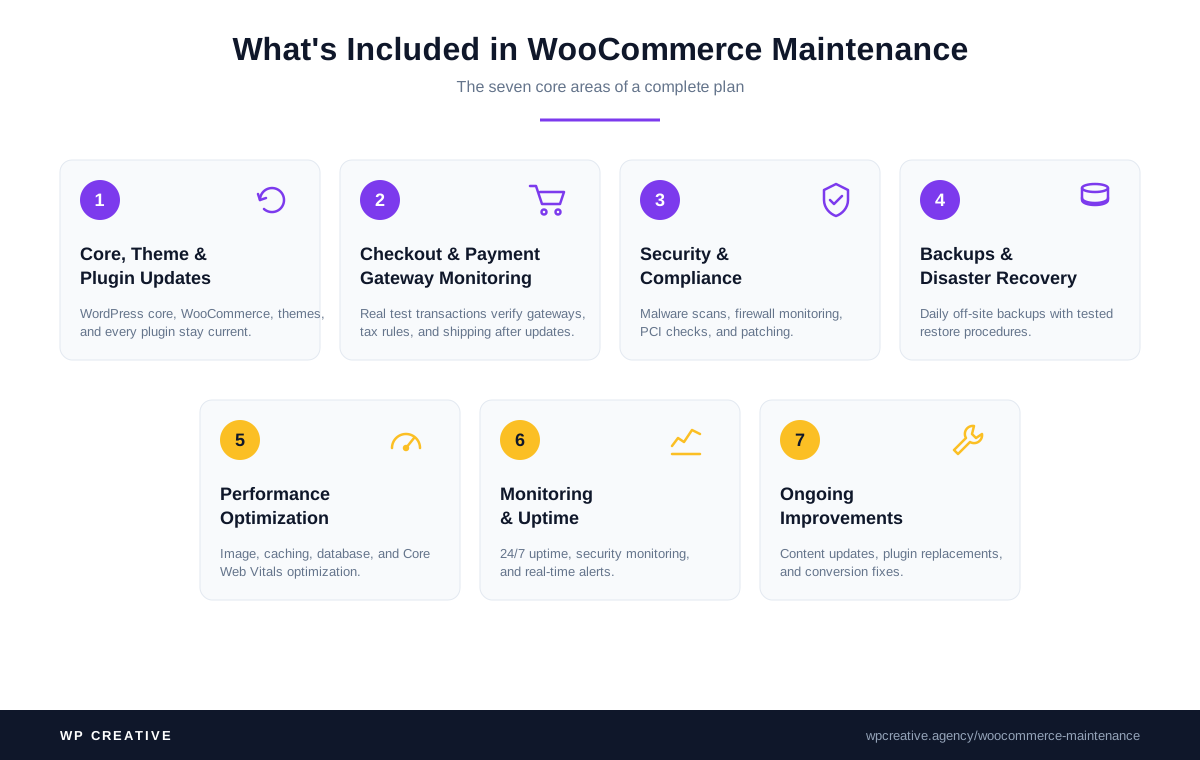
A proper WooCommerce maintenance service includes seven core areas:
1. Core, theme, and plugin updates
WordPress core, WooCommerce, your theme, and every plugin stay current. Critical security patches get tested on a staging site and pushed within days. Feature updates run on a scheduled rhythm. Routine backups run before any update to ensure compatibility.
2. Checkout and payment gateway monitoring
Real test transactions run through the full checkout flow on a regular cadence. Every payment gateway, tax rule, and shipping method is verified after each update. Payment gateways like Stripe and PayPal push their own changes that can break compatibility silently, so each one is tracked separately.
3. Security and compliance
Malware scanning, firewall monitoring, login hardening, PCI compliance checks, threat detection, and security checks all run continuously, with known security vulnerabilities patched as soon as they’re disclosed. Stores handling card data carry compliance weight that a regular WordPress site doesn’t. Regular security audits should run quarterly.
4. Backups and disaster recovery
Daily routine backups are stored off-site, with tested restore procedures running on a schedule. Most stores discover their backup strategy was broken the day they need it. A proper service performs backups before every plugin update as a safety measure.
5. Performance optimization
Image optimization, caching setup, database optimization, query optimization, and Core Web Vitals monitoring all run on an ongoing basis. Slow load times kill conversions. Performance optimization is core to WooCommerce maintenance, not optional.
6. Monitoring and uptime
24/7 uptime checks, security monitoring, real-time error log monitoring, broken links detection, and server logs review happen continuously. Alerts fire when something goes wrong. The goal is to catch issues before customers do. Google Search Console gets checked weekly for crawl errors and indexation issues.
7. Ongoing improvements
Small content updates, plugin replacements, conversion fixes, and the dozens of minor changes that keep a store competitive happen every month. Maintenance is not a one-time setup. Every one of these tasks runs on a cadence, every week, every month, every quarter.
Why WooCommerce Maintenance Is Different From WordPress Maintenance
If you’re already running WordPress maintenance, you might assume your WooCommerce store is covered. It usually isn’t.
WordPress maintenance focuses on the platform. WooCommerce website maintenance focuses on the platform plus the store. That’s a different scope, a different risk profile, and a different cost base.
Six things separate the two:
Checkout is mission-critical
A broken sidebar widget on a blog is a small problem. A broken Stripe integration on a store can cost thousands per hour. WooCommerce maintenance has to include scheduled, repeated checkout testing. Most WordPress maintenance plans don’t.

Slow website wasting your marketing spend?
- Uncover performance issues
- Identify SEO opportunities
- Security gaps, and quick wins
Payment gateways update independently
Stripe, PayPal, Square, and Authorize.net all push their own changes. Each one can break compatibility with WooCommerce or your checkout plugins. Maintenance has to track these separately and test updates in a staging environment.
Tax and compliance rules shift constantly
Sales tax in the US, VAT in Europe, GST in Australia; every jurisdiction changes rules. WooCommerce stores often use third-party plugins like Avalara or TaxJar that need active monitoring to ensure compatibility.
Plugin sprawl is heavier
A typical WordPress website might run 15 to 20 plugins. A typical WooCommerce store runs 25 to 40 plugins and themes. More plugins mean more update collisions, more plugin conflicts, more compatibility issues, and more attack surface.
Performance has a direct revenue cost
A 1-second delay in load time can drop conversions by 7%. In a store, that’s a measurable line on your P&L. WordPress maintenance treats site performance as a nice-to-have. WooCommerce maintenance treats it as core.
WooCommerce support requires specialist knowledge
Store-specific issues like checkout failures, payment disputes, and tax errors need a team trained on WooCommerce, not generic WordPress support. Generic teams can’t troubleshoot inventory sync, WooCommerce versions, or third-party plugin compatibility.
If you’re paying for WordPress maintenance and selling through WooCommerce, you’re underinsured.
What Happens When You Skip WooCommerce Maintenance
This is the part most guides skip. They tell you to run maintenance because it’s “important,” but never show you the real cost of not doing it.
Here’s what we see when stores come to us after a long stretch without proper maintenance:
1. Revenue loss from broken checkouts
The single biggest hit. A payment gateway update that nobody tested takes the checkout offline. The store keeps showing products, but the cards stop processing. Sometimes it runs broken for days before anyone notices because owners watch revenue dashboards, not error logs.
2. Sales lost to slow load times
Image bloat, database overgrowth, and slow queries quietly drag down site speed. Conversions drop. The owner blames marketing, ads, or seasonality. The real problem is a 6-second product page.
3. Security and data breaches
Unpatched plugins are the most common entry point for WooCommerce attacks. Most data breaches in eCommerce trace back to outdated software and plugin conflicts that nobody caught. A breach means stolen customer data, PCI fines, lost customer trust, and weeks of recovery costs. Insurance rarely covers preventable breaches.
4. SEO rankings and search engine rankings collapse
Slow eCommerce websites, broken links, and indexed checkout URLs damage SEO. Google rewards fast, stable stores and penalizes the rest. Search rankings recovery takes months, not weeks. A drop in SEO rankings hits revenue directly through reduced organic traffic.
5. Customer support load and damaged customer experience
When things break quietly, customer service teams catch the fallout. Missing orders, charged-but-not-confirmed transactions, abandoned carts that should have converted. The cost shows up in your support team’s workload, in damaged customer experience that drives one-star reviews, and on your bottom line, but not on a maintenance invoice. Customer satisfaction drops measurably within weeks.
6. Compounding tech debt
The longer maintenance gets deferred, the harder it becomes. Plugins get years out of date. Themes stop receiving security updates. Migrating or fixing the store eventually requires a rebuild, not a tune-up.
Most owners don’t see these costs because they’re invisible until they aren’t. The store looks fine until the day it isn’t.
Maintenance is insurance against revenue you don’t realize you’re losing.
The Complete WooCommerce Maintenance Checklist

Before running any high-risk maintenance task, two things matter: a staging environment to test in, and the ability to put your store into maintenance mode if you need to take the live site offline briefly.
WooCommerce maintenance mode shows a maintenance page to visitors while you push major updates or migrations, so customers don’t hit a broken checkout mid-transaction. Enabling maintenance mode during low traffic periods is a best practice for any change that could disrupt the buying experience.
For the setup details, see our guide on WordPress maintenance mode, which applies to WooCommerce stores too.
Here’s the full checklist, organized by frequency.
Daily Tasks
- Verify regular backups completed successfully and are stored off-site
- Check uptime monitoring for outages or slow response times
- Review security alerts, failed login attempts, and malicious traffic flags
- Monitor payment gateways status pages for incidents
- Process refunds and customer support escalations
Weekly Tasks
- Apply software updates, including WordPress core, WooCommerce, themes, and plugins (after staging site tests)
- Run a full test transaction through the checkout flow on the live site
- Review server logs and error logs for new warnings or fatal errors
- Check Core Web Vitals and key site speed metrics
- Moderate spam comments and review abandoned cart data
- Confirm SSL certificates are healthy and renewal dates are current
- Check Google Search Console for new crawl issues
Monthly Tasks
- Run full malware scanning and vulnerability scans
- Perform database optimization (revisions, transients, expired sessions)
- Review and clean up unused plugins, themes, and media files
- Audit user accounts and remove inactive admins
- Test backup restoration on a staging environment
- Review analytics for revenue, conversion, and traffic anomalies
- Check broken links across the store
- Verify tax rates and shipping rules remain current
Quarterly Tasks
- Review plugin stack: replace abandoned plugins, consolidate redundant ones
- Audit checkout flow conversion rate and identify drop-off points
- Run a full PCI compliance check (if processing card data directly)
- Review and update privacy policy, terms of service, and consent banners
- Test mobile experience across iOS and Android devices
- Audit page-level SEO performance, metadata, and search rankings
- Review the hosting plan capacity against the current website traffic
Yearly Tasks
- Full security audit by a third party
- Theme and codebase review for technical debt
- Plugin license renewals and review
- Compliance audit (PCI, GDPR, CCPA, state-level US privacy laws)
- Disaster recovery plan review and tabletop test
- Hosting contract review and renegotiation
- Strategic review of integrations, marketing stack, and roadmap
Schedule heavy maintenance tasks during low traffic periods to minimize the risk of disruption. A store running this cadence is rare. A store running half of it is already ahead of most of its competitors.
The 7 WooCommerce Maintenance Tasks Most Plans Miss
Generic WordPress maintenance plans cover the basics. WooCommerce-specific tasks are where stores actually win or lose. These are the seven that get missed most often, and the seven that matter most for revenue.
1. Real checkout testing after every update
Not a smoke test. A full transaction with a real credit card, real tax calculation, real shipping method, and a real order confirmation email. Plugin updates can quietly break any of these without throwing an error.
A proper maintenance service includes scheduled checkout testing after every update window, with verification that the order lands in WooCommerce, the confirmation email arrives, and the payment shows in the gateway dashboard. When something does break, the failure usually surfaces in the gateway before WooCommerce reports it.
2. Payment gateway dashboard reviews
Logging into Stripe, PayPal, and any other gateway every week to check for failed transactions, suspicious activity, dispute volume, and API deprecation warnings. Failed payment spikes are usually the first sign of a checkout regression after a plugin update.
A climbing dispute rate is usually a symptom of slow refunds or bad shipping estimates, not the gateway itself. Stripe and PayPal publish API deprecation timelines weeks in advance, so a good service catches them before they break compatibility.
3. Abandoned cart recovery health checks
Confirming abandoned cart emails are sending, personalizing correctly, and that the discount codes still work. This single workflow often recovers 5% to 15% of lost revenue when it’s functioning.
Health checks verify that the recovery email lands within the expected window, that the customer name and product image render correctly, and that the discount code applies on click. If the workflow breaks after a plugin update, most owners discover it months later when revenue is already gone.
4. Tax rules and compliance audits
US sales tax changes constantly at the state level. EU VAT thresholds shift. Stores selling across jurisdictions need active monitoring, not a “set and forget” install.
The audit covers tax plugin configuration (Avalara, TaxJar, or WooCommerce Tax) across every state and country you sell into, verifies that new SKUs and jurisdictions are covered, and cross-checks rates against what accounting expects. Misconfigured tax is one of the most painful problems to unwind months later.
5. Product schema and rich result monitoring
WooCommerce product schema drives Google Shopping listings, product-rich results, and AI Overview citations. Broken schema kills product visibility silently. Monitoring confirms price, availability, review count, and image all parse correctly across a sample of product pages.
SEO plugins like Yoast, Rank Math, and WooCommerce’s own schema output can clash after updates. When the schema breaks, the product page looks fine to visitors but disappears from rich results.
6. Inventory sync verification
When inventory syncs with a POS, ERP, or marketplace, that sync breaks more often than anyone admits. A proper service includes weekly spot-checks of stock levels across systems, flagging SKUs that show out-of-stock in WooCommerce but in-stock in the source system (or the reverse), and verifying the sync ran within its expected window.
The cost of broken sync is not theoretical: overselling damages customer satisfaction, underselling hides revenue, and both happen quietly.
7. Speed optimization for product and category pages
Generic speed tests run on the homepage. The pages that drive conversion are product pages and category archives. These need separate, ongoing performance improvements. The WordPress speed optimization service covers monthly Core Web Vitals and PageSpeed Insights checks on top product and category pages, regression detection on Largest Contentful Paint and Cumulative Layout Shift. A 1-second slowdown on a product page costs more than the same slowdown on the homepage.
Most agency maintenance plans don’t include all seven. If yours doesn’t, you’re paying for WordPress maintenance and calling it WooCommerce maintenance.
How Much Does WooCommerce Maintenance Cost?
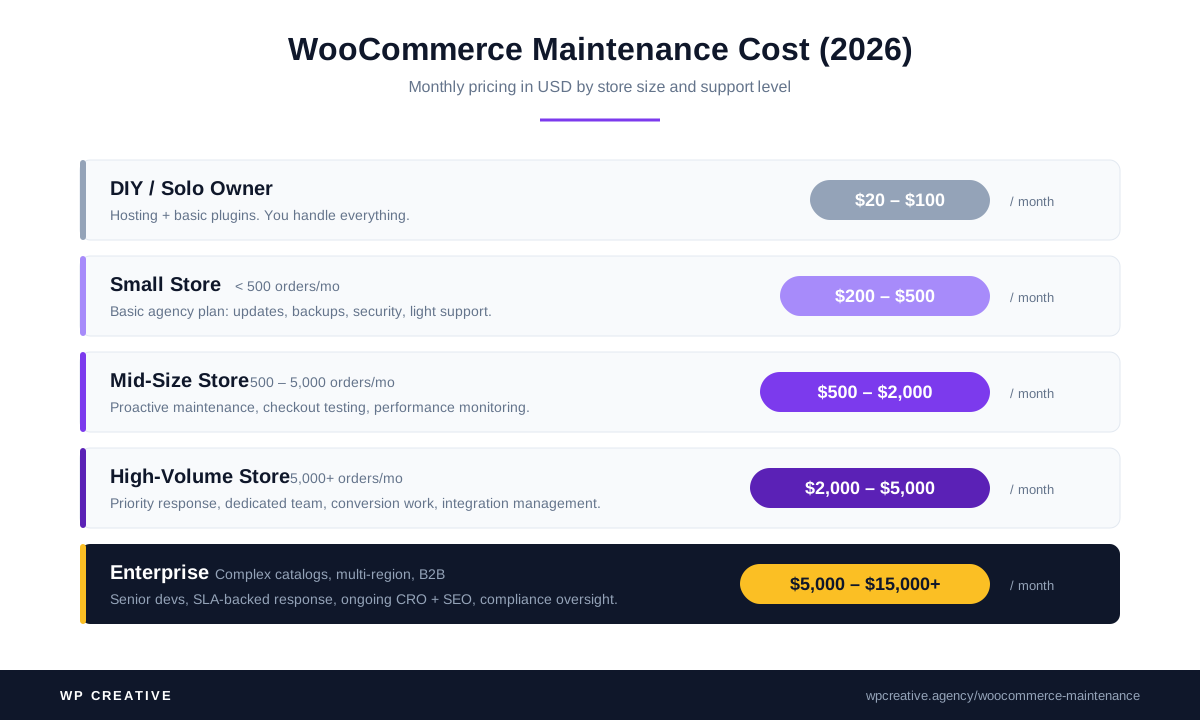
WooCommerce maintenance costs vary widely. Here’s the honest breakdown in US dollars for 2026.
| Store Type | Monthly Cost | What’s Covered |
|---|---|---|
| DIY / Solo Owner | $20 – $100 | Hosting, automated backup plugin, basic security plugin. You do everything else. |
| Small Store (< 500 orders/mo) | $200 – $500 | Basic agency plan: software updates, regular backups, security, light support. Usually shared resources. |
| Mid-Size Store (500 – 5,000 orders/mo) | $500 – $2,000 | Proactive maintenance: checkout testing, performance monitoring, faster response times, dedicated developer hours. |
| High-Volume Store (5,000+ orders/mo) | $2,000 – $5,000 | Full proactive plan: priority response, dedicated team, conversion work, integration management. |
| Enterprise (Complex catalogs, multi-region, B2B) | $5,000 – $15,000+ | Custom plan: dedicated senior developers, SLA-backed response, ongoing CRO and SEO, integrations support, security and compliance oversight. |
The gap is wide because stores carry very different levels of risk. A 200-product fashion brand running on a clean theme with three plugins has nothing in common, operationally, with a 30,000-SKU B2B catalog running on a custom theme with 40 plugins and ERP integration.
For a broader breakdown across all website types, see our website maintenance cost guide.
Three factors drive WooCommerce maintenance costs up:
Order volume: More orders mean more support load, more transaction monitoring, more refund handling, and more checkout edge cases.
Plugin and integration complexity: Every integration is a maintenance liability. ERP sync, custom shipping, subscription billing, and marketplace feeds all increase the surface area.
SLA expectations: Faster response times cost more. A four-hour SLA costs more than a 48-hour SLA. A priority-on-call setup for emergency fixes costs more again.
For a deeper look at what drives website maintenance pricing generally, see our WordPress maintenance cost guide.
In-House vs. DIY vs. Agency: Which Is Right For You?
There’s no single right answer. There’s a right answer for your stage.
| Approach | Best For | Cost | Risk Level |
|---|---|---|---|
| DIY | Solo founders, hobby stores, side projects | $20 – $100/mo | High. You’re the single point of failure. |
| Freelancer | Stores under $20k/mo revenue with simple needs | $300 – $1,000/mo | Medium. Skill varies wildly, response times unpredictable. |
| In-House Developer | Stores with $1M+ revenue and constant change | $80k – $150k/yr salary | Low when staffed well, high when you can’t find or retain. |
| Specialist Agency | Stores generating real revenue that needs protecting | $500 – $5,000+/mo | Low. Bench depth, accountability, SLAs. |
The honest framing: if your store generates more than $50k/year in revenue, the cost of a single hour of broken checkout exceeds a month of professional maintenance. The math stops being interesting at that point.
DIY makes sense up to a threshold. Past it, the cost of your time and the risk of a breach outweigh the savings.
How to Choose a WooCommerce Maintenance Provider
Most WooCommerce maintenance services look identical on a sales page. The differences show up when something breaks. Use these six questions to separate the providers who can actually carry your store from the ones who can’t.
1. Do they specialize in WooCommerce, or do they treat it as an add-on?
Generalist WordPress agencies often bolt WooCommerce maintenance services onto a standard maintenance plan. The skill set is different. Ask how many WooCommerce stores they currently support and what’s the largest by revenue.
2. What’s their response time SLA, and is it in writing?
“As soon as possible” is not an SLA. Look for response time tiers tied to severity, with a clear escalation path for outages and emergency fixes.
3. Do they test on staging before pushing updates to production?
Plenty of agencies push updates straight to the live site. This is how stores break. A staging site and update windows are the minimum bar. Test updates first, then push.
4. Who actually does the work?
Some agencies sell senior expertise on the sales call and outsource the actual maintenance to junior offshore teams. Ask who you’ll work with and what their experience level is.
5. What’s included vs. billed separately?
Maintenance plans almost always have a scope. Software updates, regular backups, and security are usually included. Custom development, conversion work, and new features are usually billed. Get the line drawn clearly before you sign.
6. Can they show you detailed reports and results?
Site speed improvements, conversion lifts, security insights, and security incidents handled. Real numbers from real clients. If they can’t show you outcomes, they probably don’t measure them.
WP Creative’s WooCommerce maintenance plans are built around these standards: WooCommerce specialists, written SLAs, staging-first updates, senior US-based developers, transparent scope, detailed reports, and case studies that show measurable revenue and performance impact.
When to Upgrade Your WooCommerce Maintenance Plan
If you already have a maintenance plan, here’s how to know when you’ve outgrown it.
You should consider an upgrade when:
- Your monthly revenue has more than doubled since you signed up
- You’ve added a major integration (ERP, POS, subscription billing, marketplace)
- Site speed has slowed and your current provider hasn’t flagged it
- You’ve had more than two unexplained outages in a quarter
- Support response times have stretched beyond what your business can tolerate
- You’re spending leadership time on issues your maintenance team should handle
- You’re approaching a major sales event (Black Friday, peak season, product launch)
- Your store has become mission-critical to business growth
The signal underneath all of these is the same: your store has grown past the level of risk and complexity your current plan was built for.
Maintenance plans don’t auto-scale. You have to scale them deliberately. Talk to us about an enterprise WordPress development plan.
Protect Your Revenue Engine
WooCommerce maintenance is not an IT chore. It’s revenue protection. Every hour your store runs without breakage, every page that loads fast, every checkout that completes cleanly, that’s maintenance doing its job. A well-maintained WooCommerce store keeps customer trust high, customer satisfaction up, and search engine rankings stable.
If you want the work handled by a team of senior WooCommerce developers who treat your store like the revenue engine it is, talk to us. We run WooCommerce maintenance plans for stores ranging from boutique to enterprise, built to support business growth as your online business scales, with response times measured in hours and case studies that show 49% to 144% improvements in traffic, speed, and conversion.
Book a call, and we’ll show you exactly what your store needs and what it should cost.
WooCommerce Maintenance FAQs
What is WooCommerce maintenance?
WooCommerce maintenance (also called WooCommerce website maintenance) is the ongoing process of updating, securing, monitoring, backing up, and optimizing a WooCommerce store. It covers WordPress core, WooCommerce, themes, plugins, payment gateways, security monitoring, performance optimization, and checkout testing. The goal is to keep the store fast, stable, and revenue-ready.
How often should I maintain my WooCommerce store?
Daily for routine backups and uptime checks. Weekly for software updates, checkout tests, and error log reviews. Monthly for malware scanning, database optimization, and analytics audits. Quarterly for plugin stack reviews and compliance checks. Yearly for full security audits and disaster recovery testing.
How much does WooCommerce maintenance cost per month?
WooCommerce maintenance costs range from $20 per month for a basic DIY setup to $15,000+ per month for enterprise stores. Small stores typically pay $200 to $500, mid-size stores $500 to $2,000, and high-volume stores $2,000 to $5,000.
See our full WooCommerce maintenance pricing context for the comparison.
Can I do WooCommerce maintenance myself?
Yes, if your store is small, you have technical comfort, and you have the time. Most owners stop being able to keep up once orders cross 100 per month or the plugin stack passes 15 plugins. After that, the time cost and risk cost both rise faster than agency fees.
What’s the difference between WordPress maintenance and WooCommerce maintenance?
WordPress maintenance covers the platform. WooCommerce maintenance and WooCommerce support cover the platform plus the store: checkout testing, payment gateway monitoring, tax rule audits, abandoned cart health, product schema, and inventory sync. WooCommerce stores carry more risk per visitor, which raises the standard for what both maintenance and support have to include.
What happens if I skip WooCommerce maintenance?
The risks compound. Broken checkouts cause direct revenue loss. Slow stores lose conversions. Unpatched plugins invite security breaches and data breaches. SEO rankings drop. Tech debt builds until a tune-up becomes a rebuild. Most of these costs are invisible until they aren’t.
Do I need a maintenance plan for a small WooCommerce store?
Yes, but the plan can be light. At minimum: automated daily backups, automatic security patching, plugin updates on a staging-first cadence, and a weekly five-minute checkout test. A basic plan starts at $200 to $500 per month, or DIY if you have the time and skill.
Why does my WooCommerce store keep breaking?
The most common reasons are plugin conflicts after updates, payment gateway changes that weren’t tested on staging, outdated WordPress core or WooCommerce versions, hosting plan capacity issues, and theme incompatibilities. WooCommerce stores break more often than blogs because they run more plugins and integrate more third-party services. The fix is routine maintenance: a staging-first update process, weekly checkout testing, and active security monitoring. If your store keeps breaking, the underlying problem is almost always that maintenance is reactive instead of proactive.
How do I choose a WooCommerce maintenance provider?
Pick a provider that specializes in WooCommerce (not just WordPress), publishes a written SLA, tests updates on a staging site before production, assigns senior developers to your account, draws a clear scope around what’s included vs. billed, and can show you detailed reports and measurable results from real clients.

Get Your Free Website Audit
($3,000 Value)
- Uncover performance issues
- Identify SEO opportunities
- Security gaps, and quick wins