Website Maintenance 101: The Ultimate Guide


Get Your Free Website Audit
($3,000 Value)
- Uncover performance issues
- Identify SEO opportunities
- Security gaps, and quick wins
Most websites are not ruined by one big failure. They are worn down by small issues that go unnoticed for too long.
A missed update, a broken form, a slow page, or an expired backup can quickly turn into bigger problems.
Website maintenance is the ongoing work that keeps your site secure, up to date, fast, and functioning the way it should. It helps protect the performance of your website over time, rather than waiting for something to break before acting.
In this guide, we break down what website maintenance involves, what it usually includes, how long it takes, what it costs, and when it makes sense to get website maintenance services.
Table of Contents
- What is Website Maintenance?
- Why is Website Maintenance Important?
- What Does Website Maintenance Include?
- How Long Does Website Maintenance Take?
- Website Maintenance Checklist: Weekly, Monthly, Quarterly, and Annual Tasks
- Website Maintenance Tips and Best Practices
- DIY Website Maintenance vs Hiring a Professional
- How Much Does Website Maintenance Cost?
- How to Choose a Website Maintenance Provider
- Why Get Website Maintenance Services from WP Creative
- Final Thoughts on Website Maintenance
- Website Maintenance FAQs
What is Website Maintenance?
Website maintenance is the ongoing process of keeping a website secure, updated, fast, and functioning properly over time. It includes regular website maintenance tasks like software updates, security checks, backups, performance monitoring, and content updates.
A good website maintenance service helps website owners keep their online presence reliable, user-friendly, and ready to support both the website’s SEO and the overall business.
Why is Website Maintenance Important?
A website is never really finished. Regular maintenance keeps it secure, visible, fast, and dependable, so it can continue supporting your business instead of quietly creating problems in the background.
1. Security Protection
A regularly maintained website is far less likely to run into preventable security threats. Updating your website’s software, plugins, and integrations helps keep your site secure and protects important website data from vulnerabilities, malware, and unauthorized access.
2. Better SEO Performance
Website maintenance also supports search engine optimization by keeping your website content fresh, fixing broken links, and making sure key pages stay up to date. These improvements help search engines crawl your site properly and support stronger search engine rankings over time.
3. Faster Website Performance
Over time, websites can slow down due to outdated plugins, unoptimized files, and technical clutter. Regular maintenance helps improve site speed and overall site performance, which is essential for keeping visitors engaged and conversions on track.
4. Improved User Experience
People expect a seamless user experience when they land on your site. Ongoing website support and maintenance help ensure your pages load properly, forms work as they should, and the site remains user-friendly across devices and browsers.
5. Protects Business Reputation
Your website often shapes the first impression people have of your business. When it stays updated, functional, and professional, it builds trust and supports a positive customer experience instead of turning site visitors away.
What Does Website Maintenance Include?
Website maintenance is not just one task. It involves several layers of work that keep a site secure, stable, fast, and visible in search engines.
Below are the most important types of website maintenance that keep a site functioning properly over time.
1. Security Maintenance
Security maintenance protects your website from malware, data breaches, and unauthorized access. Since new vulnerabilities are discovered regularly, websites must be monitored and patched continuously to remain secure.
Typical security maintenance tasks include:
- Malware scanning
- Firewall monitoring
- Vulnerability security patches
- SSL certificate management
- Updating plugins and themes
Without consistent security updates, even a well-built website can quickly become vulnerable.
2. Technical Maintenance
Technical maintenance focuses on the systems that keep the website functioning properly behind the scenes. This includes maintaining the content management system, integrations, and core software that power the site.
Common technical maintenance activities include:

Slow website wasting your marketing spend?
- Uncover performance issues
- Identify SEO opportunities
- Security gaps, and quick wins
- Plugin and theme updates
- Server configuration checks
- Bug fixes and error resolution
- Testing third-party integrations and APIs
- Configuring and monitoring server settings
- Content management system (CMS) updates
- Checking website forms and key functionality
These updates help ensure compatibility with browsers, hosting environments, and third-party tools.
3. Performance Maintenance
Performance maintenance ensures that the website loads quickly and remains responsive for users. Over time, databases grow, scripts accumulate, and files become unoptimized, which can slow the site down.
Performance maintenance typically involves:
- Speed optimization
- Caching configuration
- Image optimization
- Database cleanup
- Removal of unused plugins and scripts
Improving site speed not only enhances user experience but can also positively affect search engine rankings.
4. Content Maintenance
Content maintenance keeps the website relevant and useful for visitors. Websites that are regularly updated with accurate information and fresh content tend to attract more engagement and trust from both users and search engines.
Content maintenance often includes:
- Updating existing pages
- Publishing new blog posts
- Refreshing outdated information
- Updating visuals, images, and multimedia
- Improving readability and formatting
Regular content updates also help maintain a consistent and active online presence.
5. SEO Maintenance
SEO maintenance ensures that your website remains visible in search engine results pages. Search engines continuously evaluate websites, so ongoing optimization helps maintain rankings and organic traffic.
SEO maintenance commonly includes:
- Fixing broken links and redirects
- Updating meta titles and descriptions
- Improving internal linking structure
- Implementing or updating schema markup
These efforts help search engines crawl and understand your site more effectively.
6. UX and Design Maintenance
User experience (UX) maintenance focuses on making the website easy to navigate and accessible across different devices. As technology and user expectations evolve, websites must adapt to maintain a seamless experience.
UX and design maintenance may involve:
- Improving navigation and menu structure
- Ensuring mobile responsiveness
- Fixing accessibility issues
- Testing usability across devices and browsers
- Updating layouts and interface elements
- Refining calls-to-action and user journeys
A user-friendly site encourages visitors to stay longer and engage more with your content.
How Long Does Website Maintenance Take?
Website maintenance usually takes around 3 to 12 hours per month for a standard, actively maintained website. Most routine weekly checks only take 10 to 30 minutes at a time.
But as a site becomes more complex, handles more traffic, or goes longer without maintenance, the time required increases quickly.
The time required depends on things like:
- the size of the website
- how often content changes
- the number of plugins, apps, or integrations in use
- whether the site handles leads, orders, bookings, or customer accounts
- how neglected the site has been
- how quickly issues need to be fixed when they appear
| Website Type | Typical Time Required | What That Usually Covers |
|---|---|---|
| Small business website | 1–3 hours per month | Plugin updates, backups, security checks, uptime monitoring, and small fixes |
| Standard business website | 3–12 hours per month | Regular updates, performance checks, SEO maintenance, form testing, and content edits |
| eCommerce or custom website | 5–15+ hours per month | Product updates, integration checks, security monitoring, technical fixes, and ongoing support |
| Neglected or high-complexity website | Several hours to a few days | Major updates, malware cleanup, compatibility issues, performance problems, and overdue maintenance |
Website Maintenance Checklist: Weekly, Monthly, Quarterly, and Annual Tasks
Website maintenance is easier to manage when it follows a set routine. Breaking it down by timeframe helps keep the site secure, up to date, and functioning properly without letting important tasks pile up.
The checklist below outlines the key maintenance activities most websites should follow.
1. Weekly Website Maintenance Tasks
Weekly maintenance focuses on quick checks that ensure the site is operating normally and remains secure. These tasks usually take only a few minutes but help catch issues before they become larger problems.
Typical weekly checks include:
- Check website’s uptime to ensure the site is accessible to visitors
- Update plugins and themes to keep the website’s software secure
- Review security alerts and monitor for suspicious activity
- Monitor website traffic to detect unusual drops or spikes
2. Monthly Website Maintenance Tasks
Monthly maintenance goes a step deeper and focuses on performance, SEO, and backup readiness. These tasks help keep the site reliable, visible, and easier to recover if something goes wrong.
Monthly tasks usually include:
- Run a full website backup to protect website data
- Review performance and site speed using performance tools
- Monitor SEO performance and keyword rankings
- Audit broken links to prevent crawl errors and poor user experience
3. Quarterly Website Maintenance Tasks
Quarterly maintenance looks beyond routine upkeep and focuses on improving the overall health of the site. This is a good time to review how the website is performing from both a technical and user experience perspective.
Quarterly tasks often include:
- Conduct a content audit to update or remove outdated pages
- Test the website’s user experience (UX) and user behavior across devices and browsers
- Clean and optimize the website database
- Review site speed and overall performance trends
4. Annual Website Maintenance Tasks
Annual maintenance is where you step back and review the bigger picture. These checks help ensure the website remains aligned with current technology, business goals, and search engine requirements.
Annual tasks typically include:
- Review the website design and layout for potential improvements
- Renew domain registration and confirm ownership details
- Review hosting performance and plan suitability
- Conduct a full SEO audit to evaluate search engine rankings and opportunities
Website Maintenance Tips and Best Practices
A good maintenance process is not just about reacting to problems. It is about building habits that keep the website reliable over time.
These best practices help reduce avoidable issues and make the website easier to manage as it grows.
1. Automate Backups
Automating backups protects your website data and ensures you can restore the site quickly if something goes wrong. Most web hosting platforms or hosting service providers offer automated backup options, making it easier to protect the website without manual work.
2. Monitor Website Uptime
Uptime monitoring alerts you immediately if the website becomes unavailable. Catching downtime early helps protect the website’s ranking in search engines and prevents disruptions to visitors and potential customers.
3. Test Updates in a Staging Environment
Before applying major updates to your live website, it is best to test them in a staging environment. This helps identify conflicts between plugins, themes, or website builders before they affect the live site.
4. Keep Documentation of Changes
Tracking updates, plugins, and configuration changes makes it easier to troubleshoot issues later. Good documentation also helps teams manage the maintenance process more efficiently.
5. Conduct Periodic Website Audits
Periodic audits help identify performance issues, outdated content, broken links, and technical problems. These audits ensure the website remains optimized and continues supporting business goals.
DIY Website Maintenance vs Hiring a Professional
Some website owners manage site maintenance themselves, while others rely on a professional service provider. The right choice depends on your technical knowledge, the site’s complexity, and how important the website is to your business.
When DIY website maintenance makes sense
DIY maintenance can work well when:
- The website is relatively simple
- Changes are infrequent
- The business has someone with enough technical confidence
- Downtime or small issues do not create major commercial risk
- The team has time to stay on top of updates, backups, and routine checks
For some businesses, DIY maintenance is a practical way to keep costs lower while retaining full control over the site.
DIY Website Maintenance Pros
- Lower cost compared to professional web maintenance services
- Full control over updates and site changes
DIY Website Maintenance Cons
- Time-consuming, especially as the site grows
- Requires technical knowledge to manage updates, security, and performance issues
When professional website maintenance makes more sense
Professional support becomes more valuable when:
- The website is important for leads or revenue
- The site has more moving parts, integrations, or custom functionality
- Updates need to be handled carefully
- Downtime would affect business performance
- No one internally wants to own the technical responsibility
A good maintenance provider does more than react to problems. They help prevent them by handling routine work properly, spotting issues early, and keeping the site stable behind the scenes.
Hiring a Professional Pros
- Access to technical expertise and faster fixes
- Proactive monitoring to keep the site secure and up to date
- Regular performance optimization and routine maintenance are handled for you
Hiring a Professional Cons
- Higher ongoing cost compared to DIY maintenance
- Less direct control over small day-to-day changes
- The quality of support depends heavily on the service provider you choose
How Much Does Website Maintenance Cost?
Website maintenance costs typically range from $50 per month to $25,000+ per month, depending on the size of the website, the level of support required, and how complex the platform is.
Below is a quick overview of typical website maintenance pricing based on the type and complexity of the website.
| Website Type | What’s Usually Included | Monthly Cost | Best For |
|---|---|---|---|
| Small Business Website | Software updates, security checks, backups, minor content edits, and uptime monitoring | $50 – $500 | Local service businesses, consultants, small teams |
| Medium Business / SMB | Ongoing updates, technical support, performance checks, SEO fixes, form testing | $200 – $1,500 | Growing businesses with more pages, traffic, and lead generation needs |
| eCommerce Website | Security, speed optimization, plugin and app updates, checkout testing, product or integration support | $500 – $5,000 | Online stores processing orders, payments, and customer data |
| SaaS / Marketing Website | Performance monitoring, technical SEO, landing page support, analytics checks, conversion-focused maintenance | $750 – $3,500 | SaaS brands, lead generation sites, campaign-driven businesses |
| Enterprise / Custom Website | Advanced security, custom development support, infrastructure monitoring, SLA-driven support, and ongoing technical maintenance | $2,000 – $25,000+ | Large organizations, custom platforms, high-traffic, and business-critical websites |
How to Choose a Website Maintenance Provider
Not all providers handle website maintenance the same way. The right partner should be able to keep your site up to date, protect your secure website, and support both performance and growth as your needs change.
When comparing providers, look for:
- Experience: Choose a provider with experience maintaining the type of website you have, whether it is a small business site, eCommerce store, or custom build.
- Response time: Make sure they can respond quickly when issues affect a key web page, sales flow, or lead generation path.
- Security practices: Ask how they handle backups, updates, malware prevention, and other essential tasks needed to keep the site secure.
- Reporting transparency: A good provider should clearly show what has been updated, what issues were found, and how the maintenance process is being managed.
- Uptime monitoring: Ongoing monitoring helps catch downtime early, especially on websites that rely on steady web traffic and user engagement.
- Scalability: Your provider should be able to support your website as it grows, so your online presence continues without gaps in support or performance.
Why Get Website Maintenance Services from WP Creative
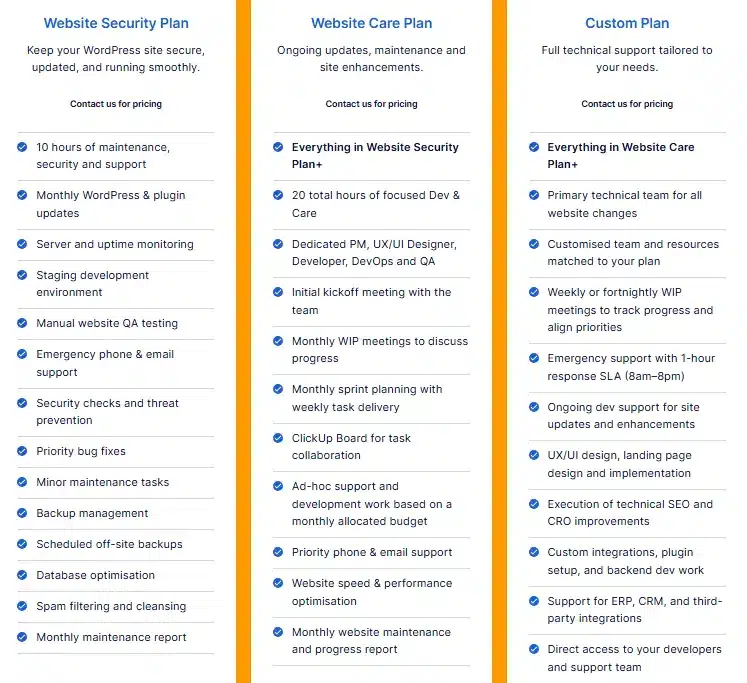
Website maintenance is not something you want to leave to chance. WP Creative helps businesses stay ahead of security risks, performance issues, and unexpected downtime with proactive website maintenance services built for long-term reliability.
As a US-based website performance agency, we support local businesses, eCommerce brands, and growing companies that rely on their website for leads, sales, and trust.
With technical expertise, fast support, and a proactive approach, we keep your website secure, optimized, and running smoothly behind the scenes.
If your website needs ongoing support, stronger protection, and a team that stays ahead of issues, WP Creative can help. Contact us today!
Final Thoughts on Website Maintenance
By now, you know website maintenance is not just a technical task sitting in the background. It is what keeps your site secure, fast, visible, and reliable as your business grows.
The longer maintenance is ignored, the easier it is for small issues to turn into lost traffic, lost leads, and expensive fixes. Staying consistent with updates, monitoring, and ongoing improvements gives your website a much better chance of performing the way it should.
A strong website is not just built well. It is maintained well.
Website Maintenance FAQs
What does website maintenance include?
Website maintenance usually includes software updates, security checks, backups, performance monitoring, bug fixes, broken link checks, and content updates. It can also include SEO improvements, uptime monitoring, and technical support to keep the site secure, fast, and functioning properly.
What should I know about website maintenance?
Website maintenance is an ongoing process, not a one-time task. It helps prevent security issues, performance problems, and broken functionality while keeping the website reliable for visitors and easier to manage over time.
How often should website maintenance be done?
Website maintenance should be done on a regular schedule. Some tasks, like uptime checks and plugin updates, are often handled weekly, while deeper tasks like backups, SEO reviews, and performance checks are usually done monthly or quarterly.
What are the factors that affect website maintenance costs?
Website maintenance cost depends on the size of the website, the complexity of its features, the number of plugins and integrations, and how often updates are needed. Security requirements, content changes, and the level of support required also affect pricing.
How much does web maintenance cost per month?
Web maintenance costs can range from around $50 per month to $25,000+ per month, depending on the type of website and the level of support it needs. A small business website usually costs far less to maintain than an ecommerce, enterprise, or custom-built platform.
What is a website maintenance plan?
A website maintenance plan is an ongoing service agreement that covers the routine work needed to keep a website updated and running smoothly. It often includes updates, backups, monitoring, support, security checks, and other maintenance tasks based on the needs of the site.
If you are comparing website maintenance options, it is also worth reviewing different website maintenance packages to see what level of support, monitoring, and response time best fits your website.
What factors affect website maintenance costs?
The main factors include site size, platform complexity, traffic levels, number of integrations, and how frequently the site’s content changes. Costs can also increase if the website needs faster support, stronger security, or more hands-on technical work.
What tools are commonly used for website maintenance?
Website maintenance often relies on a mix of monitoring, security, and performance tools to keep the site running smoothly. For example, tools like Google Search Console help track search performance and technical issues, while PageSpeed Insights or GTmetrix can be used to check site speed. Security plugins such as Wordfence or Sucuri help protect the site from threats, and monitoring tools like UptimeRobot can alert you if the website goes offline.

Get Your Free Website Audit
($3,000 Value)
- Uncover performance issues
- Identify SEO opportunities
- Security gaps, and quick wins