Why Is My WordPress Site So Slow? 12 Causes and Fixes

Get Your Free Website Audit
($3,000 Value)
- Uncover performance issues
- Identify SEO opportunities
- Security gaps, and quick wins
Table of Contents
- TL;DR
- Where Should You Start?
- Test Your Site Speed First
- The 12 Causes of a Slow WordPress Site
- Why Is My WordPress Admin Slow?
- Real Speed Wins. What “Fixed” Looks Like
- DIY or Hire Someone?
- How Fast Should a WordPress Site Be in 2026?
- FAQs
- Bottom Line
WordPress is not slow by default. The Verge runs on WordPress. So does TechCrunch. What makes WordPress sites slow is a small set of fixable problems, almost always stacked together.
A one-second delay costs you 7% of conversions. Three seconds cost you 20%. On mobile, 53% of users leave before your site loads at all.
Slow website speed is one of the fastest ways of losing visitors before they ever read a word. Fixing the 12 causes below is the difference between a slow WordPress website and one that pays for itself.
TL;DR
- Top 5 causes of a slow WordPress site: cheap shared hosting, page builders (Elementor, Divi), unoptimized images, plugin bloat, no caching.
- Three fixes that solve 70% of slow sites: move to managed WordPress hosting, compress images, and install a caching plugin.
- What “fast” actually means in 2026: mobile PageSpeed 80+, LCP under 2.5s, INP under 200ms, CLS under 0.1.
- Skip to the diagnostic flow if you want to know where to start. The order below is sequenced by frequency.
Where Should You Start?
Four questions tell you which section to read first.
| Symptom | Likely cause | Read first |
|---|---|---|
| Slow on every page | Hosting or PHP | Cause #1, #7 |
| Slow on certain pages only | Images or page builder | Cause #2, #3 |
| Slow suddenly (last 72 hours) | Recent change or attack | FAQ “all of a sudden” |
| Slow gradually over months | Database bloat, plugin sprawl | Cause #4, #8 |
| Slow admin, fast front-end | Heartbeat, low memory, plugin admin page | Admin section |
| Slow mobile, fast desktop | Images, render-blocking JS, third-party scripts | Cause #3, #6, #10 |
Or skip this and book a free website audit. We send back a video walkthrough.
Test Your Site Speed First
Three free speed testing tools cover everything you need to measure loading speed.
- Google PageSpeed Insights for Core Web Vitals scored against Google’s own benchmarks.
- GTmetrix for waterfall charts that show what is loading slowly.
- WebPageTest for tests from different locations.

Google PageSpeed Insights is the one most marketing teams default to because it pulls real-world data from actual Chrome users on your site. Ignore YSlow. The tool has not been actively maintained since 2014.
The three numbers that matter
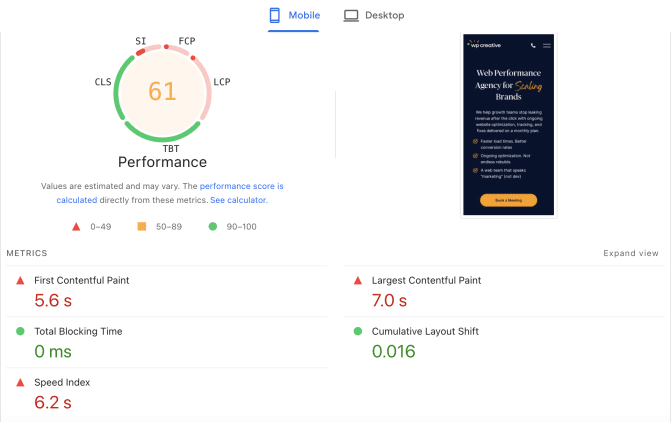
- LCP (Largest Contentful Paint). Target under 2.5 seconds.
- INP (Interaction to Next Paint). Target under 200ms. 43% of websites still fail this.
- CLS (Cumulative Layout Shift). Target under 0.1.
The average WordPress site scores 35 to 55 on mobile PageSpeed. Most slow WordPress sites have three to five simultaneous causes, not one big one. The most common reasons sit in the first five below.
The 12 Causes of a Slow WordPress Site
1. Cheap or oversold shared hosting
The single biggest cause of a slow WordPress site. Cheap shared hosting plans put hundreds of sites on the same web server. Every site competes for the same server resources. Any traffic spikes on a neighbour can drag your entire site down. Poor quality web hosting limits everything you do after.
Diagnose: Run a Time to First Byte (TTFB) test. Over 600ms means hosting is your bottleneck. Under 200ms is good.
Fix
- Move to managed hosting (Kinsta, WP Engine, Cloudways, Pressable). $30 to $100 a month for most small business sites. Managed WordPress hosting handles caching, security, and updates at the web server level.
- For unpredictable traffic patterns, look at cloud or dedicated server plans with guaranteed resources.
- Add uptime monitoring (UptimeRobot is free) so slow load times and downtime get spotted early.
A single hosting move often creates a huge difference of 40+ PageSpeed points. Better hosting is the biggest lever you can pull.
2. Page builders eating your performance
Elementor, Divi, and WPBakery generate heavy DOM trees, redundant CSS, and stacked JavaScript files on every page. The performance issues compound on mobile.
Custom WordPress builds consistently score 80+ on mobile PageSpeed. Sites built with Elementor or Divi typically score in the 40 to 65 range. Same hosting, same hardware. The gap is the page builder.
Diagnose: Open Chrome DevTools, check DOM size. More than 1,500 nodes on the homepage is too many.
Fix
- Strip unused widgets and bundled plugins.
- Replace heavy widgets (sliders, animated counters, parallax) with lighter alternatives.
- For revenue-critical sites, a custom WordPress development rebuild on native Gutenberg blocks raises the ceiling.
Our WordPress speed optimization service regularly turns builder-driven sites into 80+ mobile scores without a full rebuild.
3. Unoptimized images
Image optimization is usually the easiest big win. Most sites have large images and oversized images, 5 to 20 times larger than they need to be. Every unoptimized image forces the user’s screen to wait.
Diagnose: Chrome DevTools, Network tab, sort by size. Any image over 200KB needs work.
Fix
- Resize to the largest size that will actually display. A 4,000-pixel photo serving a 1,200-pixel column is a waste.
- Compress with ShortPixel, Imagify, or TinyPNG. The good plugins compress images automatically on upload.
- Serve modern formats. WebP and AVIF deliver the same image quality at 30 to 50% smaller file sizes than JPEG or PNG.
- Enable lazy loading. WordPress includes it natively since version 5.5.
These three steps regularly help WordPress pages load faster by 30 to 60% with no other changes.
4. Too many plugins (or the wrong plugins)
The number of WordPress plugins matters less than the weight per plugin. Heavy plugins fire scripts on every page load. Bloated plugins create compatibility issues. Outdated plugins create security vulnerabilities and security risks that slow performance as a side effect.

Slow website wasting your marketing spend?
- Uncover performance issues
- Identify SEO opportunities
- Security gaps, and quick wins
One bad plugin can tank a fast site. Forty good WordPress plugins rarely do.
Diagnose: Install Query Monitor. It shows which plugins are slowest per page load.
Fix
Quarterly plugin audit. For each plugin, three questions:
- Do you still use it?
- Is it actively maintained (last update within 12 months)?
- Is there a lighter alternative?
Deactivate and delete anything that fails. Consolidate overlapping plugins (three SEO plugins become one). Multiple plugins doing similar jobs are almost always the wrong choice.
5. No caching, or caching that is not configured
Caching turns your dynamic WordPress site into static HTML for repeat website visitors. Without it, your server rebuilds every page from scratch on every visit.
A caching plugin installed but never properly configured is worse than no caching at all. The owner thinks it is working. It is not.
Diagnose: DevTools, Network tab, check response headers for cache-control, x-cache, or x-rocket-cache. None of those means no caching is active.
Fix
- Install WP Rocket, LiteSpeed Cache, or W3 Total Cache.
- Most quality WordPress hosts include server-level caching. Check with your hosting provider before adding a plugin.
- Enable caching at every layer (page, browser, object).
6. Render-blocking JavaScript and CSS
The cause PageSpeed flags most often, and the one that most articles barely cover.
When your browser hits a stylesheet or script in the document head, it stops rendering until that file downloads and parses. Stack multiple render-blocking resources, and you create a visible delay before anything appears.
Diagnose: PageSpeed Insights, “Eliminate render-blocking resources” warning. It lists the exact files.
Fix
- Defer non-critical JavaScript with the defer attribute.
- Inline critical CSS (styles for content above the fold) directly in the HTML.
- Move script tags to the footer where possible.
- WP Rocket, LiteSpeed Cache, and Autoptimize handle this if you do not want to touch code.
7. Outdated PHP version
PHP is the language WordPress runs on. PHP 8 is significantly faster than PHP 7.
- WordPress on PHP 8.3 executes 20 to 40% faster than on PHP 7.4. No code changes required.
- WooCommerce stores with shopping carts see around 21% improvement on PHP 8.4 over PHP 7.4.
Diagnose: WordPress dashboard, Tools > Site Health > Info > Server. Current PHP version is listed.
Fix
Ask your host to upgrade to PHP 8.2 or newer. Test on staging first to catch any plugin compatibility issues. Most actively maintained plugins are PHP 8-ready.
8. Database bloat
Your WordPress database stores everything. Posts, pages, options, transients, old post revisions, spam comments, expired sessions, plugin settings.
Over years of normal use, the WordPress database accumulates clutter that slows every query. Bloated databases add processing time to every page load and create server strain on shared hosting.
Diagnose: Install WP Optimize. Run a scan. First scans on uncleaned sites report tens of thousands of unnecessary rows.
Fix
- Run an optimization to clear old post revisions, expired transients, spam comments, and orphaned metadata.
- Cap post revisions by adding define(‘WP_POST_REVISIONS’, 5); to wp-config.php.
- Schedule a monthly cleanup. Full process documented in the WordPress maintenance checklist.
9. Heavy themes
Heavy themes load multiple font libraries, animation packages, slider libraries, and demo content code on every page. Even perfect hosting cannot save you from a bad theme. Bloated themes are one of the most common reasons WordPress page speed plateaus after every other fix.
Diagnose: Run Google PageSpeed Insights on the theme developer’s own demo site. If the demo is slow, your site will be too.
Fix
- Lightweight, well-maintained themes built for performance include GeneratePress, Kadence, Astra, and Blocksy. For revenue-critical sites, a custom Gutenberg block theme built around your business goals outperforms every commercial theme on the market.
10. External scripts (ads, chat, tracking, fonts)
Every third-party script and tracking code adds a network request. Google Fonts, Facebook Pixel, Google Tag Manager, Intercom chat, Hotjar recording, retargeting pixels. Each one adds load time. Each one fails if the third-party server is loading slowly.
Diagnose: PageSpeed Insights, “Reduce the impact of third-party code” section. Lists every external script and the load time it adds.
Fix
- Audit external scripts quarterly. Remove anything you no longer use.
- Host Google Fonts locally instead of loading from Google’s CDN.
- Use delayed loading for non-critical scripts so chat widgets and tracking codes do not block page render.
- Plugins like Asset CleanUp or Perfmatters give per-page control over which scripts load.
11. No CDN, or a misconfigured one
A Content Delivery Network serves your static assets (images, CSS, JavaScript) from servers physically closer to your visitors. For audiences spread across the country or globally, a CDN cuts 200 to 500ms off load times in distant regions.
Diagnose: DevTools, Network tab, click any image. If the request URL is your domain, no CDN is active. If it shows a cdn. subdomain or Cloudflare URL, the CDN is working.
Fix
- Cloudflare has a free tier that covers most small business needs. BunnyCDN, KeyCDN, and Stackpath are paid options. Most managed WordPress hosts include a CDN already.
12. Excessive or chained redirects
Redirects send visitors from one URL to another. Useful when URLs change. Damaging when chained (A goes to B goes to C goes to D), or when your internal links still point to old URLs.
Diagnose: Use Redirect Checker or Screaming Frog. Look for chains over two hops.
Fix
- Update internal links to point directly to current URLs.
- Consolidate chained redirects into single 301s.
- Remove anything no longer needed.
Why Is My WordPress Admin Slow?
Slow admin is almost always a different problem from slow front-end. The 12 fixes above will not help.
- WordPress Heartbeat API polling every 15 seconds while you edit. Install Heartbeat Control and slow it to 60 seconds.
- Low PHP memory limit. WordPress recommends 256MB. Many shared hosts cap at 64MB or 128MB. Raise WP_MEMORY_LIMIT in wp-config.php.
- A single plugin’s admin page loading heavy reports or external API calls. Query Monitor identifies it.
- wp-cron stacking up on shared hosting. Disable in wp-config.php and run a real server cron job through your host.
If your admin is unusable, our WordPress support team typically pinpoints the cause within two hours.
Real Speed Wins. What “Fixed” Looks Like
Three WP Creative client sites. Real before-and-after numbers.

| Client | Mobile Before | Mobile After | Desktop Before | Desktop After | Business Result |
|---|---|---|---|---|---|
| Tile Factory Outlet | 15 | 88 | 48 | 99 | +28% traffic, +75% quote requests in 6 months |
| Gregory Jewellers | 27 | 66 | 56 | 81 | +144% mobile speed, +45% desktop |
| Ironfish | (60% lift overall) | +100% traffic, +89.66% lead conversion |
None of these WordPress speed wins came from a single fix. Each was a coordinated combination of web hosting, image work, database cleanup, render path optimization, and custom theme tuning. The work that lifts website speed across all three Core Web Vitals is delivered through our WordPress Speed Optimization Service, Website Care Plan, and Website Performance Plan.
DIY or Hire Someone?
A simple decision rule.
Fix it yourself if all of these are true.
- One obvious problem (oversized images, one bad plugin, missing caching).
- Fewer than 20 active plugins.
- Small business brochure, blog, or simple portfolio.
- You have the technical knowledge to edit WordPress files.
- You are not losing revenue every day the problem exists.
Hire a WordPress agency if any of these are true.
- Multiple Core Web Vitals in the red.
- Mobile PageSpeed below 50.
- WooCommerce, shopping carts, or a membership site.
- You already tried basic fixes, and the site is still slow.
- The site drives lead generation, bookings, or sales, and every slow day costs measurable revenue.
- Technical issues your hosting support cannot resolve.
Most slow WordPress sites that need outside help have three or four overlapping causes. Diagnosing and fixing them in the right order is what we do. For a free diagnostic, book a WordPress audit, and we will send back a video walkthrough.
How Fast Should a WordPress Site Be in 2026?
Numbers for any serious business site.
| Metric | Target | Top performers |
|---|---|---|
| Largest Contentful Paint (LCP) | Under 2.5s | Under 1.8s |
| Interaction to Next Paint (INP) | Under 200ms | Under 150ms |
| Cumulative Layout Shift (CLS) | Under 0.1 | Under 0.05 |
| Time to First Byte (TTFB) | Under 200ms | Under 100ms |
| Mobile PageSpeed | 80+ | 90+ |
| Total page weight | Under 1.5MB | Under 1MB |
These benchmarks are achievable with the right hosting, a clean theme, and the 12 fixes above. They form the foundation of the WPO Framework, our internal methodology for website performance.
FAQs
Why is my WordPress site so slow all of a sudden?
Something changed in the last 72 hours. The usual culprits are a recent plugin or theme update, a traffic spike that overloaded hosting, an expired or misconfigured CDN, an SSL renewal that broke caching, or a hacked site serving malicious scripts. Hacked sites also create security vulnerabilities that need cleaning before any speed fix sticks.
How do I speed up my WordPress site?
Three fixes solve 70% of slow WordPress sites.
- Upgrade hosting if Time to First Byte is over 600ms.
- Compress and resize every image.
- Install a caching plugin (WP Rocket, LiteSpeed Cache, W3 Total Cache) and configure it properly.
Most pages load faster within a single afternoon of work.
Why is my WordPress dashboard so slow?
Usually the WordPress Heartbeat API polling too often, a low PHP memory limit, or one heavy plugin’s admin page. See the dedicated admin section above.
How fast should a WordPress website load?
Under 2.5 seconds for LCP and a mobile PageSpeed of 80+ are the targets that matter for business sites. The average WordPress site scores 35 to 55, so 80 already puts you in the top quartile.
Is WordPress slow by default?
No. WordPress runs The Verge, TechCrunch, the New York Post, and most of Vox Media on WordPress VIP. Properly built, WordPress is among the fastest CMS options available. Search engines respond to that speed with better google rankings.
Why is my WordPress site slow on mobile but fast on desktop?
Mobile users see different loading speed problems than desktop users. Three likely causes.
- Large unoptimized images served at desktop dimensions on mobile devices.
- Render-blocking JavaScript that mobile networks cannot download in parallel.
- Third-party scripts (ads, chat, tracking) loading slowly on cellular connections.
Check Google PageSpeed Insights on the mobile tab specifically. Mobile page speed is what 60%+ of your visitors actually see.
Can too many plugins slow down WordPress?
It depends on the plugins. Forty lightweight, well-built plugins can be faster than five badly coded ones. What matters is code quality, how much each loads on every page, and whether plugins make external API calls during page load.
Will upgrading my hosting fix a slow WordPress site?
Sometimes. If your TTFB is over 600ms, better hosting will help significantly. Pages load quickly after a hosting move only if server response time was the real problem. If your TTFB is already under 200ms, the slowness is elsewhere.
How long does it take to speed up a WordPress site?
A simple fix (image compression, caching) takes an afternoon. A full audit and rebuild on a slow business site is typically four to six weeks. Detailed answer in How Long Does Website Performance Optimization Take.
Bottom Line
WordPress is not slow. Most WordPress sites are. The difference is rarely mysterious. Sites that feel extremely slow almost always have one of the 12 causes above, usually stacked together, accumulated over years.
The diagnostic flow at the top tells you where to start. The 12 fixes get most slow sites loading faster if you have a few hours. The 73-point mobile PageSpeed lift for TFO, the 144% lift for Gregory Jewellers, and the 89.66% lead conversion lift for Ironfish all came from working through this same list in the right order. Each turned a site that was losing visitors into one that converts them.
If you would rather hand the speed problems to someone who fixes them every day, book a free WordPress audit or learn more about our WordPress Speed Optimization Service. We send back a video walkthrough of exactly what is slowing your site and what we would do about it. No proposal, no obligation. Just a clear answer.

Get Your Free Website Audit
($3,000 Value)
- Uncover performance issues
- Identify SEO opportunities
- Security gaps, and quick wins