How Much Does Shopify Cost in 2026?


Get Your Free Website Audit
($3,000 Value)
- Uncover performance issues
- Identify SEO opportunities
- Security gaps, and quick wins
Shopify pricing has changed over the years, and store owners want clear, updated numbers heading into 2026.
So, how much does Shopify cost today? The short answer is that Shopify starts at $5/month for Starter, $39/month for Basic, $105/month for Grow, $399/month for Advanced, and $2,300/month for Shopify Plus on a 3-year term.
Pricing, however, goes beyond the monthly plan. Payment fees, apps, themes, and setup costs can all increase the real total. In this guide, we have broken down every website cost, every fee, and every hidden extra so you can choose the right Shopify setup with confidence.
Table of Contents
- Quick Overview of Shopify Pricing Plans
- Types of Shopify Plans & Packages
- What Do You Get on Each Shopify Plan?
- Shopify Fees You Need to Know About
- The Extra Costs Beyond Your Shopify Plan
- How Much Does It Cost to Build a Shopify Website?
- Additional Shopify Hidden Fees That You Should Consider
- Which Shopify Pricing Plans Is Right for You?
- How to Keep Shopify Costs Under Control
- Final Thoughts: What Does Shopify Really Cost?
- Shopify Cost FAQs
Quick Overview of Shopify Pricing Plans
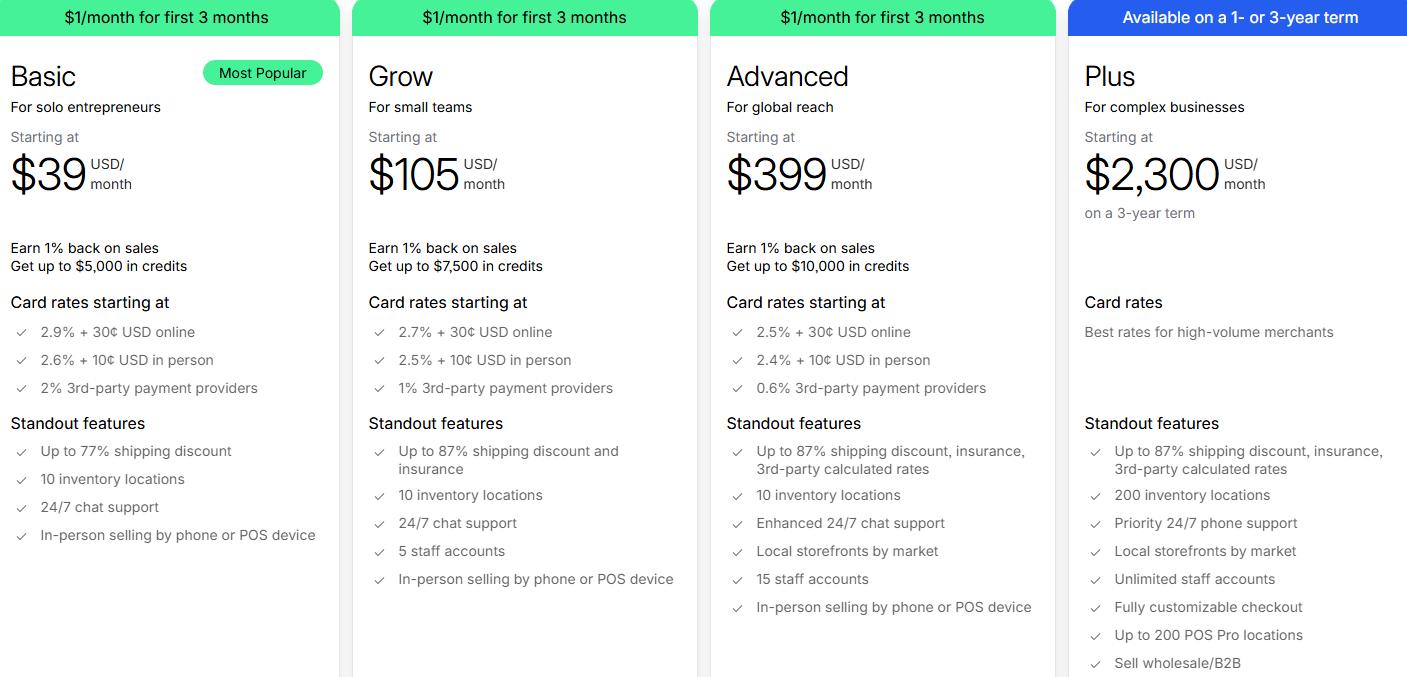
Types of Shopify Plans & Packages
Shopify offers several pricing plans for different stages of growth, from simple selling tools for beginners to enterprise solutions for large ecommerce brands.
The best Shopify package depends on how established your store is, how many people manage it, and how much flexibility you need as sales grow.
1. Basic Shopify Plan ($39/month)
Best for: solo entrepreneurs and new online stores
Basic is the lowest-priced plan that gives you a full Shopify store. It is where most businesses start when they want a proper ecommerce website with product pages, checkout, hosting, templates, and core store management tools already built in.
It is a good fit for businesses that want to launch quickly without paying for advanced reporting or team features too early. You still get the basic features that matter most, including unlimited products, multiple sales channels, Shopify Payments access, analytics, 24/7 live chat support, and up to 10 inventory locations.
Why choose Basic Plan:
Choose the Shopify Basic plan if you are launching your first Shopify store, working with a lean team, and want the lowest full-store monthly cost without losing the core ecommerce features.
2. Shopify Grow Plan ($105/month)
Best for: small teams and growing stores
Grow is the next step up once your store has moved beyond the early launch stage. It gives you the same full Shopify store setup as Basic, but adds more room to operate as a team and improves some of the day-to-day commercial benefits.
The main difference is that Grow starts to make more financial and operational sense as order volume increases. You get lower third-party transaction fees, better shipping discounts, shipping insurance, and five staff accounts, which makes it more practical for stores with a growing team and a busier sales operation.
Why choose Grow:
Choose Grow if your business is selling consistently, more people are involved in running the store, and you want a plan that gives you more flexibility without jumping to a much higher monthly price.
3. Shopify Advanced Plan ($399/month)
Best for: brands selling at higher volume or across multiple markets
Advanced is designed for businesses that need stronger reporting, lower payment rates, and better support for multi-market selling. It is built for stores that are no longer just focused on launching, but on improving efficiency and protecting margin as revenue grows.
Compared to Grow, Advanced gives you lower card rates, more staff access, enhanced support, and local storefronts by market. It also includes third-party calculated shipping rates, which can be useful for businesses with more complex shipping needs or a broader customer base.
Why choose Advanced:
Choose Advanced if lower fees, better reporting, and stronger international selling tools would make a meaningful difference to your business as it scales.
4. Shopify Plus ($2,300/month on a 3-year term)
Best for: enterprise brands, complex ecommerce setups, and B2B businesses
Shopify Plus is the enterprise plan for businesses that need more control, more customization, and infrastructure that can support serious scale. It is aimed at larger brands running high-volume ecommerce operations, wholesale operations, or multi-region setups that go beyond what the standard Shopify plans are built to handle.

Slow website wasting your marketing spend?
- Uncover performance issues
- Identify SEO opportunities
- Security gaps, and quick wins
The biggest step up with Plus is not just scale, but flexibility. It adds a fully customizable checkout, B2B selling tools, unlimited staff accounts, priority support, far more inventory locations, and advanced enterprise features for automation, integrations, testing, and expansion.
Why choose Plus:
Choose Plus if your business needs custom checkout control, wholesale functionality, enterprise support, or a setup that can handle more complex retail and ecommerce operations.
Other Shopify Options
Shopify also offers a couple of lighter or more specialized options for businesses that do not need a standard full-store setup. These are useful for simpler selling models or stores with stronger in-person retail needs.
5. Shopify Starter Plan ($5/month)
Best for: creators, side hustles, and social sellers
Starter is Shopify’s cheapest way to start selling, but it is not a full ecommerce website plan. It is designed for selling through social media, messaging apps, or a very simple online setup rather than a complete branded storefront.
It works best for testing demand, selling to an existing audience, or keeping setup costs as low as possible. For a business that wants a fully built Shopify online store, Starter will usually feel too limited.
Why choose Starter:
Choose Starter if you want the lowest-cost entry into Shopify and do not need a full online store yet.
6. Shopify POS Pro Plan ($89/month)
Best for: retailers selling in person
POS Pro is built for businesses that need stronger in-store selling tools. It adds more advanced retail functionality on top of Shopify’s standard point-of-sale setup, which makes it more useful for stores managing staff, physical locations, and omnichannel customer journeys.
It is most relevant for businesses where in-person selling is a major part of operations. Features like stronger retail workflows, buy online, pickup in store support, and more advanced staff management make it a better fit for established retail environments.
Why choose POS Pro:
Choose POS Pro if your business relies heavily on in-person sales and the standard Shopify POS features are no longer enough.
What Do You Get on Each Shopify Plan?
Shopify plans are not just priced differently. Each one is built for a different stage of business growth.
As you move up, you unlock more features, more control, and better support for scaling your store.
1. Sales Channels and Store Features
All main Shopify plans give you a full online store, access to multiple sales channels, and the core tools needed to sell online.
As you move up the pricing tiers, the storefront stays familiar, but the Shopify platform becomes better suited to stores with broader selling needs, more inventory, or international growth plans.
| Feature | Basic | Grow | Advanced | Plus |
|---|---|---|---|---|
| Full online store | Yes | Yes | Yes | Yes |
| Inventory locations | 10 | 10 | 10 | 200 |
| Local storefronts by market | No | No | Yes | Yes |
| In-person selling by phone or POS device | Yes | Yes | Yes | Listed differently on Plus pricing |
2. Staff Accounts, Reporting, and Shopify Admin Tools
Solo founders can usually manage well on Basic, but the gap between plans becomes much clearer once more people are involved in products, orders, support, and marketing.
Staff access increases as you move up, while reporting and support also improve, which makes higher plans more useful for busier operations.
| Feature | Basic | Grow | Advanced | Plus |
|---|---|---|---|---|
| Additional staff accounts | None listed | 5 | 15 | Unlimited |
| Collaborator accounts | Yes | Yes | Yes | Yes |
| Analytics and reporting | Yes | Yes | Yes | Yes |
| Support level | Live chat | Live chat | Enhanced live chat | Priority phone or live chat |
| Shopify Academy | Yes | Yes | Yes | Yes |
3. Shopify Checkout and Payment Differences
Monthly pricing only tells part of the story because payment costs change by plan too.
As order volume grows, lower card rates and lower third-party transaction fees can have more impact on total cost than the subscription itself.
| Plan | Online card rate | In-person card rate | Third-party transaction fee |
|---|---|---|---|
| Basic | 2.9% + 30¢ | 2.6% + 10¢ | 2% |
| Grow | 2.7% + 30¢ | 2.5% + 10¢ | 1% |
| Advanced | 2.5% + 30¢ | 2.4% + 10¢ | 0.6% |
| Plus | Best rates | Best rates | 0.2% |
4. B2B and Enterprise Features
Basic, Grow, and Advanced Shopify plans cover the needs of most standard online stores. Enterprise brands usually move to Shopify Plus when they need more control over checkout, wholesale selling, user access, integrations, and expansion across markets.
| Feature | Basic | Grow | Advanced | Plus |
|---|---|---|---|---|
| Fully customizable checkout | No | No | No | Yes |
| B2B on Shopify | No | No | No | Yes |
| Unlimited staff accounts | No | No | No | Yes |
| Up to 200 POS Pro locations | No | No | No | Yes |
| High-volume checkout | No | No | No | Yes |
| Exclusive API access and endpoints | No | No | No | Yes |
| Launchpad | No | No | No | Yes |
| Shopify Plus Certified App Partners | No | No | No | Yes |
Shopify Plus stands apart less because of surface-level store features and more because of the operational control it gives larger businesses. Brands selling wholesale, expanding internationally, or managing a more complex ecommerce setup usually see the biggest value here.
Shopify Fees You Need to Know About
Monthly pricing is only one part of the Shopify cost. Payment processing fees, third-party transaction fees, currency conversion, and international selling costs can all affect what you actually pay to run your Shopify store.
Below are the main Shopify fees to understand before you choose a Shopify plan.
1. Card Processing Fees
Card processing fees apply to every order, so even small rate differences can add up quickly. Those rates improve as you move up the Shopify pricing plans, which is one reason higher-tier plans start to make more sense once revenue increases.
| Plan | Online standard card rates | Online premium card rates | In-person card rates |
|---|---|---|---|
| Basic | 2.9% + 30¢ | 3.5% + 30¢ | 2.6% + 10¢ |
| Grow | 2.7% + 30¢ | 3.3% + 30¢ | 2.5% + 10¢ |
| Advanced | 2.5% + 30¢ | 3.1% + 30¢ | 2.4% + 10¢ |
| Plus | Best rates | Best rates | Best rates |
2. Third-Party Transaction Fees
Shopify charges an extra transaction fee if you use a third-party payment provider instead of Shopify Payments. That fee is separate from the payment provider’s own processing charges, which means the total cost can rise quickly if you are not careful.
| Plan | Third-party transaction fee |
|---|---|
| Basic | 2% |
| Grow | 1% |
| Advanced | 0.6% |
| Plus | 0.2% |
A store using Shopify Payments will usually avoid those extra Shopify transaction fees. A store using a third-party gateway will pay both the provider’s fee and Shopify’s additional fee.
3. Currency Conversion Fees
Currency conversion becomes relevant once you start selling across multiple markets. Shopify supports international selling across all main plans, but the cost of accepting payments in different currencies can add another layer to your total Shopify fees.
Key point:
Currency conversion costs matter more once you sell internationally at volume, especially when local currencies, local payment methods, and multi-market pricing become part of the store setup.
4. International Selling Fees
International selling goes beyond just currency conversion. Local storefronts, local domains, product pricing by market, and duties and import taxes all affect the real cost of selling across borders.
| Feature | Basic | Grow | Advanced | Plus |
|---|---|---|---|---|
| Language translation | Yes | Yes | Yes | Yes |
| Currency conversion | Yes | Yes | Yes | Yes |
| Localized selling with custom markets | Yes | Yes | Yes | Yes |
| Product pricing by market | Yes | Yes | Yes | Yes |
| Local domains | Yes | Yes | Yes | Yes |
| Duties and import taxes | Yes | Yes | Yes | Yes |
| Local storefronts | No | No | Yes | Yes |
Advanced and Plus become more useful for international growth because local storefronts are only included from Advanced onward. A store selling across multiple markets can often justify that upgrade sooner than a domestic-only business.
5. Shopify Payments vs Third-Party Gateways
Payment setup affects your Shopify monthly cost more than many store owners expect. Shopify Payments keeps billing simpler, while third-party gateways can introduce extra transaction fees on top of card processing.
| Option | What you pay | Best for |
|---|---|---|
| Shopify Payments | Card processing fees only | Most Shopify stores |
| Third-party gateway | Card processing fees + extra Shopify transaction fee | Stores that must use another provider |
A business that can use Shopify Payments will usually keep total Shopify fees lower. A business that needs a third-party payment provider should factor those extra transaction costs into the plan decision from the start.
The Extra Costs Beyond Your Shopify Plan
Your Shopify subscription is only part of the total cost of running a Shopify store. Once you move beyond the basics, extra costs can start showing up in areas like design, apps, retail tools, fulfillment, and specialist support.
Some of these costs are one-time expenses, while others become part of your ongoing monthly spend.
| Extra cost | Typical cost | What to know |
|---|---|---|
| Custom domain | $10–$20/year | Usually purchased separately if you want a branded web address |
| Shopify themes | $0–$500 | Free themes are available, while premium themes are usually a one-time purchase |
| Shopify apps | $5–$20/month to $50–$300+/month | App costs vary widely and often increase as your store grows |
| Shopify Email | First 10,000 emails included, then $1 per 1,000 | Costs rise once you start sending regular campaigns at scale |
| Shopify POS Pro | $89/month per location | Added cost for retailers that need more advanced in-store tools |
| Shopify Tax | Included on the first $100,000 of global sales | Tax complexity usually increases as your store expands |
Not every business will need all of these right away.
Even so, themes, apps, and specialist support are common enough that they should be part of your budget from the beginning.
1. Shopify Domain Name
A custom domain is usually one of the first extra costs a business pays for. While Shopify gives you the infrastructure to launch a store quickly, most brands still want their own web address to look more professional and build trust with customers.
In most cases, a domain costs around $10 to $20 per year. On its own, that is a small expense, but it still forms part of the real cost of setting up a Shopify website.
2. Shopify Themes
Shopify includes free themes, which are enough for some businesses at the start. However, once you want a stronger brand presentation, a sleeker layout, or better conversion-focused design, a paid theme often becomes the next step.
Premium themes usually range from $0 to $500 as a one-time purchase. Once custom design or deeper theme development is involved, the cost can rise well beyond the theme price itself.
3. Shopify Apps
Apps are one of the biggest reasons Shopify website costs increase over time. Many stores rely on apps for reviews, subscriptions, upsells, search, filtering, automation, and integrations with other tools.
Some apps are inexpensive, starting at around $5 to $20 per month. More advanced tools can sit in the $50 to $300+ per month range, especially when pricing is tied to usage, order volume, or feature depth.
4. Shopify Experts
Some businesses can launch with minimal outside help, while others need support from the start.
An expert Shopify developer can help with setup, design, migration, development, performance improvements, and more complex integrations.
Costs vary widely because the scope can vary widely too.
A simple setup will cost far less than a custom build, and for larger stores, expert support can become one of the biggest costs beyond the Shopify plan itself.
5. Email and Marketing Tools
Email is another cost that can stay low at first, then grow steadily as your store scales.
Shopify Email includes the first 10,000 emails, which is enough for some smaller stores early on.
After that, additional sends cost $1 per 1,000 emails up to 300,000, with lower rates beyond that point.
Stores running regular campaigns often add dedicated email platforms or other marketing tools, which creates another recurring cost on top of Shopify.
6. Shopify POS and Retail Tools
Online selling is only part of the picture for some businesses.
If you also sell in person, retail tools can add another layer of cost that is easy to overlook when comparing Shopify plans.
POS Pro costs $89 per month per location and is aimed at businesses that need more advanced in-store selling features.
Hardware such as card readers, barcode scanners, receipt printers, and cash drawers is also purchased separately, which can push the retail setup cost much higher.
7. Shipping and Fulfillment Tools
Shipping is rarely a simple flat cost. Shopify includes shipping-related features and discounted carrier rates, but your actual fulfillment costs still depend on what you sell, how you pack it, where you ship, and how many orders you process.
For that reason, shipping becomes less of a platform cost and more of an operating cost as the store grows.
Businesses with more complex fulfillment needs often end up paying for added tools, carrier integrations, or workflow improvements to keep things efficient.
8. Tax and Accounting Tools
Tax is another area that often becomes more complicated as the business grows.
Initially, the cost may feel minimal, especially with Shopify Tax included on the first $100,000 of global sales per calendar year.
As sales expand across more regions, the setup usually becomes more demanding.
Many businesses eventually need extra apps, accounting integrations, or more advanced workflows to keep tax handling and financial reporting accurate.
How Much Does It Cost to Build a Shopify Website?
Building a Shopify website can cost anywhere from a few hundred dollars to well over $50,000.
The final price depends on how custom the store needs to be, who builds it, and how much functionality you need from day one.
| Build type | Typical cost range | Best for |
|---|---|---|
| DIY Shopify store | $100–$500 | Small businesses testing demand |
| Theme-based Shopify store | $500–$3,000 | Brands wanting a polished store on a manageable budget |
| Freelancer-built Shopify store | $2,000–$10,000 | Businesses needing a custom setup without agency pricing |
| Agency-built Shopify store | $10,000–$50,000+ | Brands wanting strategy, design, and a stronger launch |
| Shopify Plus build | $30,000–$100,000+ | Enterprise brands with more complex needs |
| Headless Shopify build | $50,000–$150,000+ | Large brands needing maximum flexibility and custom UX |
1. DIY Shopify Store
A DIY Shopify store is the lowest-cost option because you handle the setup yourself in the Shopify admin. Most of the spend usually goes toward your monthly plan, domain, theme, and a few essentials from the Shopify app store rather than professional design or development.
Many small businesses start here because the payment upfront stays relatively low. A basic setup can work well in the beginning, especially when the goal is to launch a simple online store and start generating online sales without taking on a large upfront cost.
2. Theme-Based Shopify Store
A theme-based Shopify store is often the best middle ground between cost and quality. You start with a design from the Shopify theme store, then tailor it to your brand without paying for a fully custom ecommerce store from day one.
A stronger storefront usually comes together faster this way, which is why many businesses see it as the most practical option. Costs start rising once the theme needs heavier customization, extra app support, or more advanced features than the original layout was built to handle.
3. Freelancer-Built Shopify Store
A freelancer-built Shopify store suits businesses that want more polish than a DIY setup but do not need a full agency process. A freelancer can help with design changes, custom sections, Shopify checkout adjustments, app setup, and more advanced inventory management needs.
Pricing varies a lot depending on the freelancer’s experience and the scope of the project. A lighter build can stay manageable, while a store with custom reporting, more advanced analytics, or deeper app integration can move quickly toward the higher end of the range.
4. Agency-Built Shopify Store
An agency-built Shopify store usually costs more upfront, but the scope is often much broader as well. Design, development, testing, app setup, content structure, and launch support are often included as part of a more complete ecommerce platform build.
Growing brands often choose this route when the store needs to look stronger, convert better, and support serious online sales from the start. Higher pricing usually reflects more strategy, tighter execution, and fewer compromises across the entire build.
5. Shopify Plus Build
A Shopify Plus build is usually much more expensive because the businesses using it tend to need more customization, more integrations, and more operational flexibility. B2B workflows, custom checkout needs, advanced features, and broader system requirements often push the build far beyond a standard paid plan.
Enterprise brands usually move in this direction once the standard Shopify platform no longer matches the complexity of the business. Lower transaction fees can help at scale, but the real cost driver is usually the build itself rather than the monthly fees alone.
6. Headless Shopify Build
A headless Shopify build is one of the most expensive ways to build on Shopify. It separates the front end from Shopify’s back end, which gives brands much more control over performance, design, and user experience across multiple channels and online marketplaces.
Larger businesses usually choose this route when a standard storefront no longer offers enough flexibility. More freedom can be powerful, but the trade-off is a much larger initial investment, more technical complexity, and higher ongoing costs after launch.
Additional Shopify Hidden Fees That You Should Consider
The costs above are common and easy to budget for. Hidden Shopify fees are different because they usually appear once the store needs more flexibility, more support, or more work than you expected at the start.
1. Paid Apps That Stack Up
One app rarely changes the budget much. The real issue starts when your store relies on several apps at the same time for reviews, upsells, subscriptions, reporting, and inventory management.
Monthly app charges can build quietly in the background, which is why they often become one of the most underestimated Shopify costs.
2. Theme Customization
A paid theme can keep launch costs lower, but customizing it often adds another layer of expense. Design changes, extra sections, and feature tweaks usually need more work than the theme alone can handle.
Costs rise quickly once the store needs a more tailored look or a smoother customer experience than the original theme was designed to support.
3. Shopify Migration and Setup Work
Migration often looks simple until the actual work starts. Product data, customer records, redirects, collections, app settings, and payment setup all take time to move properly.
A small store may keep this process manageable, but a larger ecommerce store can turn migration into a meaningful setup cost before launch even begins.
4. Ongoing Shopify Maintenance
Shopify reduces some technical work, but it does not remove upkeep completely. App conflicts, design fixes, broken workflows, and checkout issues can still create regular support costs after launch.
Small fixes may seem minor on their own, but together they can become part of the ongoing cost of running a serious store.
5. Marketing and SEO Spend
Launching the store is only one part of the investment. SEO, paid ads, email marketing, and content creation often become necessary once the goal shifts from simply going live to generating steady online sales.
Growth usually needs a separate budget, which is why marketing spend often feels like a hidden cost to businesses that only planned for the Shopify subscription.
6. Shopify Redesigns & Rebuilds
A store that works well today may not suit the business a year from now. New product lines, higher traffic, conversion issues, or a stronger brand direction often lead to a redesign or partial rebuild.
Lower upfront costs can make sense early on, but some stores end up paying more later when bigger structural changes become unavoidable.
Which Shopify Pricing Plans Is Right for You?
The right Shopify plan depends on how you sell, how established your business is, and how much flexibility you need as the store grows.
Some plans suit simple selling setups, while others make more sense once your team, order volume, and operational needs start expanding.
Choose Starter if
- You want the cheapest way to start selling with Shopify
- You plan to sell through social media or messaging apps
- You do not need a full ecommerce store yet
- You are testing demand before committing to a larger setup
- You want to keep your monthly cost as low as possible
Choose Basic if
- You want a full online store at the lowest full-store price point
- You are launching your first Shopify store
- You have a small catalog and a lean team
- You do not need advanced reporting or extra staff accounts yet
- You want the core Shopify features without paying for higher-tier tools too early
Choose Grow if
- Your store is already generating steady online sales
- More than one person is helping manage the business
- You want lower third-party transaction fees than Basic
- Better shipping benefits and more staff access would help day-to-day operations
- You need more flexibility without jumping to a much higher monthly plan
Choose Advanced if
- Your store is handling higher order volume
- Lower payment processing fees would make a noticeable difference to margins
- You need stronger reporting and more operational visibility
- You are selling across multiple markets or planning international growth
- More staff access and better support would help the business scale
Choose Plus if
- Your business needs B2B selling or wholesale functionality
- You want more control over Shopify checkout
- Your store has complex workflows, systems, or team requirements
- You need enterprise-level support, flexibility, and scale
- Standard Shopify plans no longer match how your business operates
For a more detailed breakdown of overall ecommerce website costs, check out our guide on ecommerce website cost.
How to Keep Shopify Costs Under Control
The costs of Shopify are easier to manage when you treat the monthly plan as only one part of the budget. Most overspending happens when stores add tools, custom work, or upgrades before they are truly needed.
The simplest ways to keep costs under control:
- Start with the right plan
Choose a plan that fits your current stage, not the one you think you might need later. Paying for advanced features too early can push up your monthly cost without adding much value. - Keep your app stack lean
Apps can add up quickly, especially once your store relies on several tools at the same time. Start with the essentials and review them regularly so you are not paying for features you barely use. - Use Shopify Payments where it makes sense
Using Shopify Payments can help you avoid extra third-party transaction fees. For many stores, this keeps the cost structure simpler and lower over time. - Use a premium theme before going custom
A well-chosen premium theme can give you a polished store without the cost of full custom design and development. Custom work makes more sense once the store has proven demand and clearer requirements. - Upgrade only when the numbers justify it
A higher plan can make sense when lower fees, more staff access, or better features support real growth. Until then, staying on a simpler plan often keeps costs under better control.
Final Thoughts: What Does Shopify Really Cost?
Shopify’s real cost goes well beyond the monthly plan. Payment processing, apps, themes, and ongoing support can add up quickly, and once your store needs more customization, integrations, or room to scale, the budget often grows even faster.
That is exactly why getting the foundation right from the start matters so much. The right plan, theme, and feature stack do more than save money upfront. They make your store easier to manage, easier to grow, and far less likely to collect costly fixes and workarounds later.
The good news is you do not have to figure that out alone. WP Creative can help you get that set up right. Our team of expert Shopify developers and designers handles everything from strategy and design to development, integrations, and ongoing support, so your store is built to perform from day one and stay ready for what comes next.
Book a free consultation today, and let’s build your Shopify store the right way from the start!
Shopify Cost FAQs
Is Shopify free?
Shopify is not free as a long-term ecommerce platform. It offers a 3-day free trial, and Shopify also promotes a limited introductory offer after the trial, but running a live store requires a paid plan.
How much is a Shopify store?
A Shopify store can cost as little as $5/month on Starter for simple social selling, but a full online store usually starts at $39/month on Basic. In practice, many stores spend $100 to $2,000+ per month once you add apps, a domain, marketing tools, and other operating costs.
How much does Shopify cost per month?
The cost of Shopify currently starts at $5/month for Starter. The main store plans are $39/month for Basic, $105/month for Grow, $399/month for Advanced, and $2,300/month for Shopify Plus on a 3-year term. Shopify also offers POS Pro at $89/month per location for in-person retail.
How much does it cost to hire a Shopify expert?
Hiring a Shopify expert can cost anywhere from $50 to a few hundred dollars for small tasks, $500 to $5,000+ for setup or theme work, and $10,000+ for larger custom projects. The final cost depends on whether you need help with setup, design, development, migration, or ongoing support.
How much does Shopify Plus cost?
Shopify Plus starts at $2,300/month. Total cost often goes higher once you add custom development, apps, integrations, and enterprise support needs.
If you’d like to compare that with another platform, you can also read our guide on WordPress website cost.
How much does it cost to set up my Shopify store?
Setting up a Shopify store usually costs about $500 to $1,500 for a DIY setup, $1,000 to $5,000 for a theme-based store, $2,000 to $10,000 with a freelancer, and $10,000 to $50,000+ with an agency. The biggest cost factors are design, product setup, migration, and custom features.
How much does a custom-made Shopify site cost?
A custom Shopify site usually costs around $5,000 to $50,000+, depending on how custom the design, functionality, and integrations need to be. A larger Shopify Plus or headless build can go well beyond $100,000.
Does Shopify charge transaction fees?
Yes, but only if you use a third-party payment provider instead of Shopify Payments. Extra transaction fees are 2.0% on Basic, 1.0% on Grow, 0.6% on Advanced, and 0.2% on Plus when you use a third-party payment provider instead of Shopify Payments.
How much do Shopify apps cost?
Shopify apps can cost anywhere from free to hundreds of dollars per month. A simple store may only need a few low-cost apps, while a larger store can easily spend $50 to $500+ per month on apps alone.
When does Shopify become expensive?
Shopify usually starts feeling expensive once the cost goes beyond the monthly plan. Multiple paid apps, custom development, third-party transaction fees, marketing tools, and retail tools are the most common reasons total cost rises quickly. Many real stores move well beyond the base subscription and land in the $100 to $2,000+ per month range.
Are there any credit card fees?
Yes. Shopify charges credit card processing fees through Shopify Payments. Current online standard rates start at 2.9% + 30¢ on Basic, 2.7% + 30¢ on Grow, and 2.5% + 30¢ on Advanced. In-person rates are lower.
Is Shopify worth the cost?
Shopify is often worth the cost for businesses that want a reliable ecommerce platform with hosting, checkout, multiple sales channels, and a large app ecosystem built in. The value usually improves as the platform saves time, reduces technical overhead, and supports more online sales.

Get Your Free Website Audit
($3,000 Value)
- Uncover performance issues
- Identify SEO opportunities
- Security gaps, and quick wins